Prompt Patterns and Best Practices
2026-01-22
Today’s goals
- Learn prompt patterns that work across LLMs
- Understand what makes prompts effective
- Apply patterns to chat interfaces (like ChatGPT, Gemini)
- Apply patterns to API-based applications
- Avoid common prompting mistakes
Why prompting matters
The same model can give wildly different outputs based on how you ask.
Vague prompt: > “Tell me about climate change”
Better prompt: > “Summarize the three main causes of climate change in 2-3 sentences each, suitable for a high school science class”
Small changes in wording → big changes in output quality
The core principle
Be explicit about what you want
Don’t assume the model will infer your intentions—state them directly.
- What task should it perform?
- What format should the output take?
- What constraints or requirements apply?
- What audience or context is this for?
Pattern 1: Be specific and direct
❌ Vague: > “Write something about Python”
✅ Specific: > “Write a 100-word introduction to Python for programmers who know Java, highlighting the key syntax differences”
Include:
- The task (write, summarize, explain, compare)
- Constraints (length, format, audience)
- Context (what the reader already knows)
Pattern 2: Specify output format
Tell the model exactly how to structure its response:
“List the top 5 Python web frameworks. For each one, provide:
- Name
- One-sentence description
- Best use case
Format as a markdown table.”
Common formats: Bullet points, numbered lists, Tables, JSON, specific section headings
Pattern 3: Role/persona prompting
Give the model a perspective to adopt:
“You are an experienced Python developer reviewing code written by a beginner. Review this code and provide constructive feedback focusing on readability and best practices.”
Useful personas:
- Expert in a field
- Teacher explaining to a specific audience
- Devil’s advocate finding flaws
Pattern 4: Few-shot examples
Show the model what you want with examples:
“Convert these informal phrases to formal business language:
Informal: ‘Hey, can you send that over?’ Formal: ‘Could you please forward that document at your earliest convenience?’
Informal: ‘That’s not gonna work’ Formal: ‘Unfortunately, that approach may not be feasible’
Informal: ‘Let’s grab coffee and hash this out’ Formal: [model completes]”
2-3 examples usually suffice.
Pattern 5: Chain-of-thought
Ask the model to show its reasoning:
“A store has 45 apples. They sell 12 in the morning and receive a shipment of 30 more. How many apples do they have now? Think through this step by step.”
When to use:
- Math and logic problems
- Multi-step reasoning
- When you need to verify the logic
Chain-of-thought: example output
With “think step by step” (ChatGPT 5.2):
Let’s do it step by step:
- Start with 45 apples
- They sell 12 in the morning: \(45-12=33\).
- They receive 30 more: \(33 + 30 = 63\).
So they have 63 apples now.
The reasoning steps help catch errors and make the output verifiable.
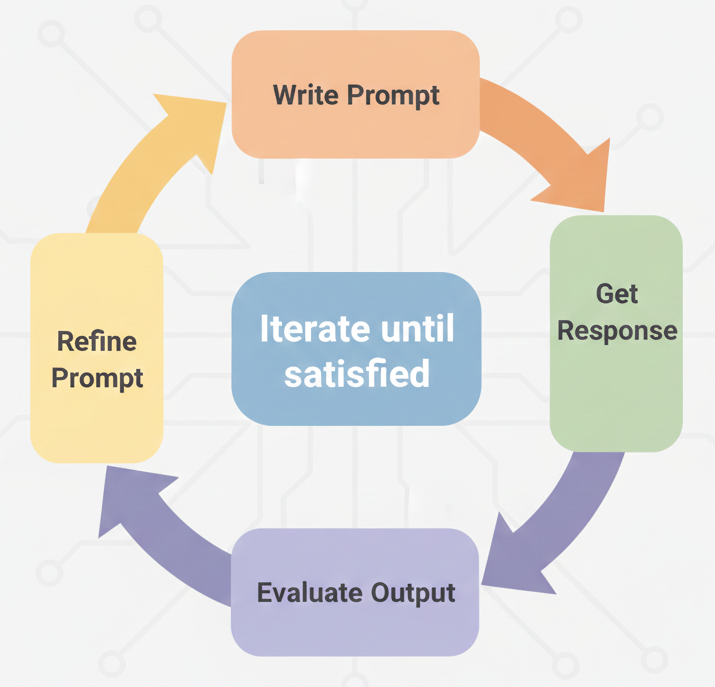
Pattern 6: Iterative refinement
Prompting is rarely one-and-done:
Chat interface tips
When using ChatGPT, Claude, Gemini chat:
- Use follow-ups: “Make it shorter” / “Add more examples”
- Reference previous context: “In the code above, explain line 5”
- Ask for alternatives: “Give me 3 different approaches to this”
- Request explanations: “Why did you choose that approach?”
The conversation history is your friend—build on it.
Moving to API: what changes?
In chat interfaces, you iterate conversationally.
In API applications, you need to:
- Design prompts that work consistently
- Handle the response programmatically
- Often use system instructions for persistent context
- Consider structured outputs for parsing
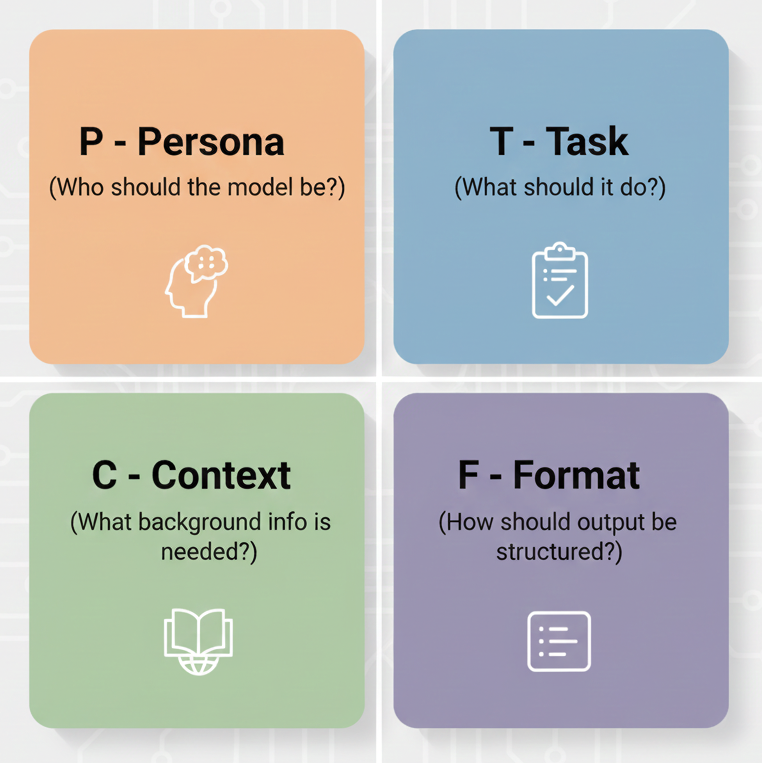
The PTCF framework
A reliable structure for API prompts:
PTCF example
prompt = """
**Persona:** You are a senior software engineer conducting code review.

**Task:** Review the following Python function for bugs, style issues,
and potential improvements.

**Context:** This code is from a beginner learning Python. Be constructive
and educational in your feedback.

**Format:** Provide feedback as a numbered list. For each issue, explain
the problem and suggest a fix.

**Code to review:**
{code}
"""

# Usage: prompt.format(code=user_code)
System instructions
System instructions set persistent context for all messages.
LangChain uses SystemMessage in the message list:
from langchain_google_genai import ChatGoogleGenerativeAI
from langchain_core.messages import SystemMessage, HumanMessage

llm = ChatGoogleGenerativeAI(model="gemini-3-flash-preview")

messages = [
    SystemMessage(content="You are a helpful coding assistant..."),
    HumanMessage(content=state["prompt"])
]
response = llm.invoke(messages)
The system message persists across the conversation.
When to use system instructions
- Persona and role definition
- Output constraints and formatting rules
- Safety guidelines
Structured outputs
For programmatic use, request structured formats:
prompt = """Extract the following from this product review:
- sentiment: positive, negative, or neutral
- key_points: list of main points (max 3)
- rating_guess: estimated star rating (1-5)

Respond in valid JSON only, no other text.

Review: {review_text}"""

# Usage: prompt.format(review_text=user_review)
LangChain provides with_structured_output() for guaranteed structure.
Structured outputs: Pydantic models
Define your output schema with Pydantic, then use with_structured_output():
from pydantic import BaseModel, Field
from langchain_google_genai import ChatGoogleGenerativeAI

class ReviewAnalysis(BaseModel):
    """Analysis of a product review."""
    sentiment: str = Field(description="positive, negative, or neutral")
    key_points: list[str] = Field(description="Main points (max 3)")
    rating_guess: int = Field(description="Estimated star rating 1-5")

llm = ChatGoogleGenerativeAI(model="gemini-3-flash-preview")
structured_llm = llm.with_structured_output(ReviewAnalysis)

result = structured_llm.invoke("This product is amazing! Great quality.")
print(result.sentiment)  # "positive"
Returns a Pydantic object—no JSON parsing needed!
Temperature for API calls
Temperature controls randomness (0.0 to 2.0).
Start at 1.0 (default), then adjust:
| Direction | Effect | When to use |
|---|---|---|
| Lower (toward 0) | More deterministic | Code, facts, structured data |
| Higher (toward 2) | More creative | Brainstorming, writing |
Prompt chaining: state and nodes
Break complex tasks into steps. Define state and node functions:
from langchain_google_genai import ChatGoogleGenerativeAI
from typing_extensions import TypedDict

llm = ChatGoogleGenerativeAI(model="gemini-3-flash-preview")

class State(TypedDict):
    article: str
    summary: str
    points: str
    questions: str

def summarize(state: State) -> dict:
    response = llm.invoke(f"Summarize this article: {state['article']}")
    return {"summary": get_text(response)}

def extract_points(state: State) -> dict:
    response = llm.invoke(f"List 3 key points from: {state['summary']}")
    return {"points": get_text(response)}

def generate_questions(state: State) -> dict:
    response = llm.invoke(f"Create quiz questions about: {state['points']}")
    return {"questions": get_text(response)}
Prompt chaining: the graph
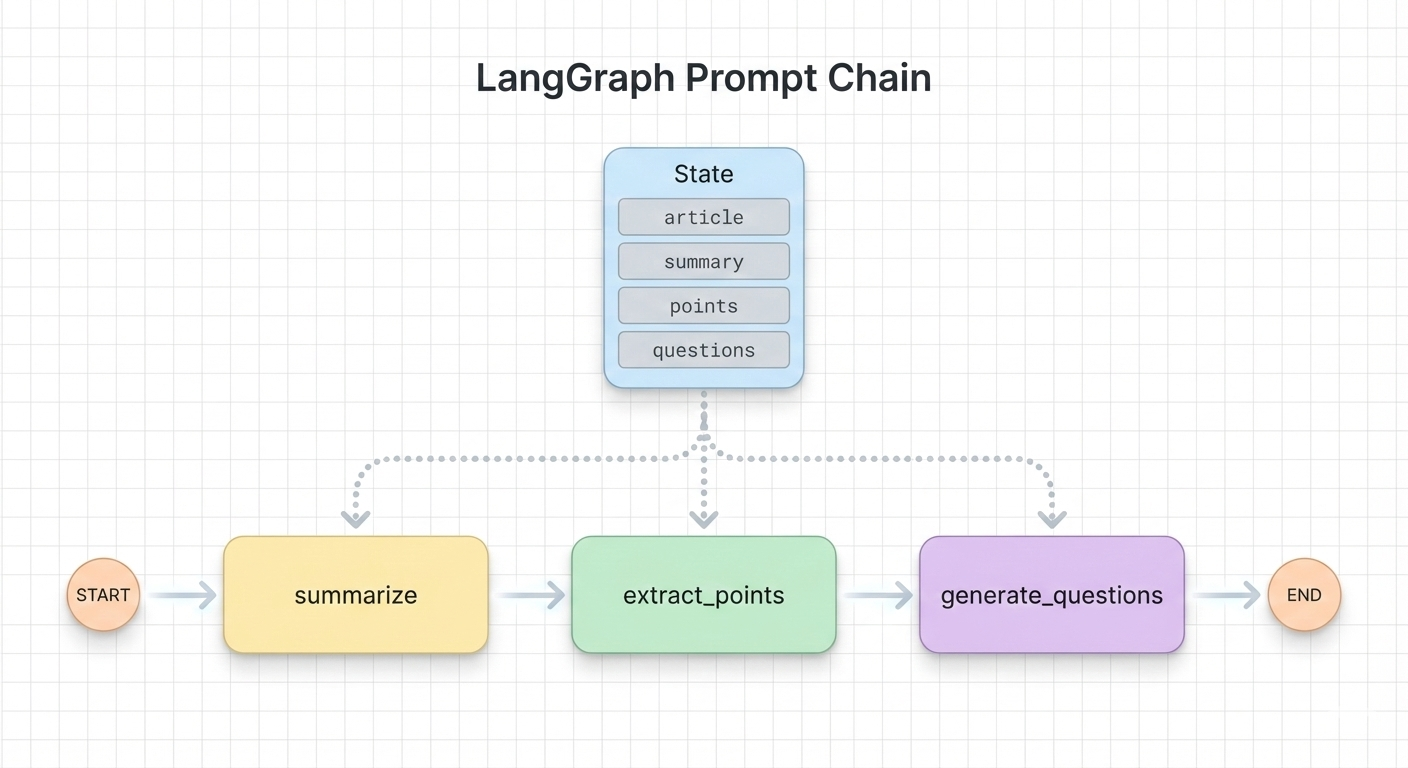
graph = StateGraph(State)
graph.add_node("summarize", summarize)
graph.add_node("extract_points", extract_points)
graph.add_node("generate_questions", generate_questions)
graph.add_edge(START, "summarize")
graph.add_edge("summarize", "extract_points")
graph.add_edge("extract_points", "generate_questions")
graph.add_edge("generate_questions", END)
app = graph.compile()
Each step is focused → better results than one giant prompt.
What to avoid
Common prompting mistakes
- Over-engineering: Longer prompts aren’t always better
- Assuming mind-reading: Be explicit, not implicit
- Negative constraints: “Don’t do X” is weaker than “Do Y instead”
- Ignoring iteration: Your first prompt rarely works perfectly
- One-size-fits-all: Different models may need different approaches
Less is more (for modern models)
Older advice emphasized lengthy, detailed prompts.
Modern models (Gemini 3, GPT-5, Claude 4) often respond better to:
- Clear, concise instructions
- Direct statements of goals
- Less “prompt engineering theater”
Test both approaches — sometimes simple wins.
Debugging prompts
When outputs aren’t what you expect:
- Check the basics: Is the task clear? Is the format specified?
- Add examples: Show what good output looks like
- Break it down: Is the task too complex for one prompt?
- Adjust temperature: Too random? Lower it. Too repetitive? Raise it.
- Try rephrasing: Sometimes different words trigger different behaviors
Key takeaways
- Be specific: State task, format, constraints, audience
- Use patterns: Personas, few-shot examples, chain-of-thought
- Iterate: Refine prompts based on actual outputs
- For APIs: Use system instructions, structured outputs, prompt chaining
- Modern models: Often prefer clarity over complexity