Multi-turn Chat and Document Retrieval
2026-02-03
Today’s goals
- Understand how multi-turn chat works with
MessagesState - Build a simple chatbot that maintains conversation history
- Learn to load and chunk documents using LangChain
- Implement keyword search with
BM25Retriever - Combine chat + search into a document Q&A agent
Single-turn vs multi-turn
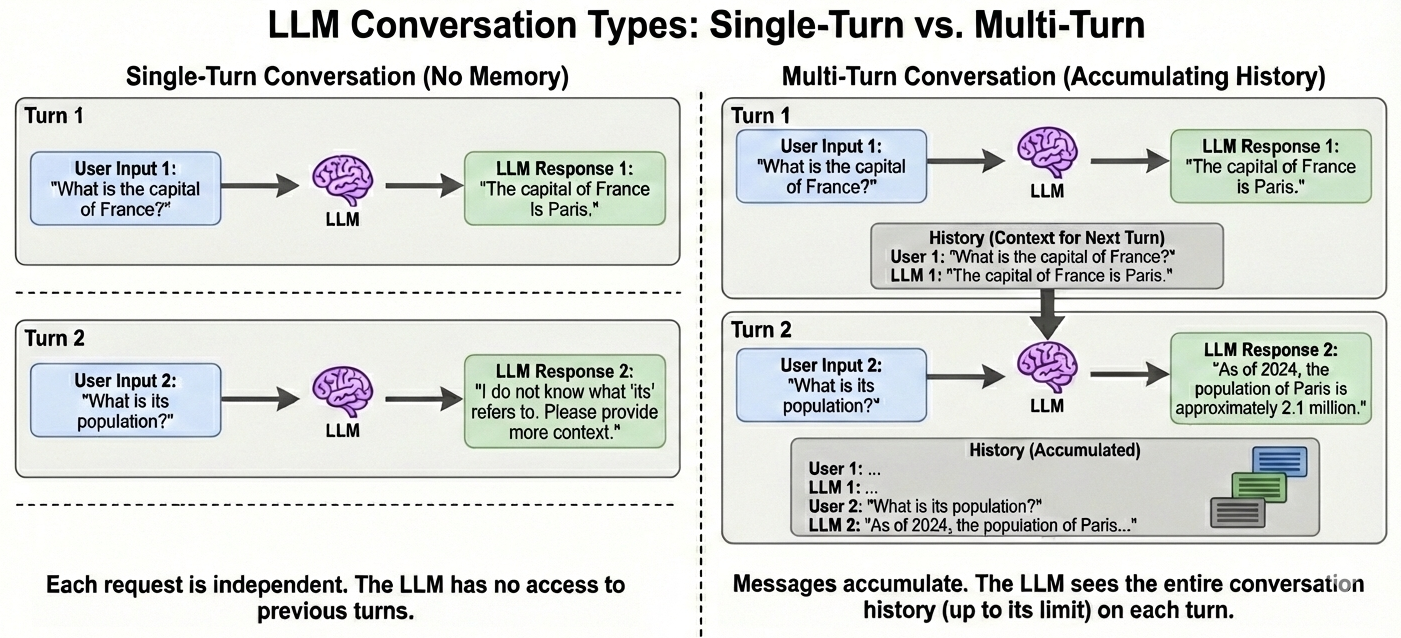
How chat history works
When you use ChatGPT, Claude, or Gemini, the interface:
- Stores all previous messages (yours and the model’s)
- Sends the entire history with each new request
- Appends the new response to the history
The model doesn’t “remember”—it re-reads the full conversation every time.
MessagesState revisited
In deck 05, we used MessagesState for tool calling. Let’s look closer:
Note
Annotated is standard Python for attaching metadata to type hints. Here, add_messages is the metadata — LangGraph uses it as a reducer that appends messages instead of replacing them. AnyMessage covers HumanMessage, AIMessage, SystemMessage, ToolMessage, etc.
The append behavior
When a node returns {"messages": [new_msg]}:
This is what enables multi-turn conversation—history accumulates automatically.
You saw this pattern in deck 05: messages accumulated through the tool loop (human → AI → tool → AI).
Simple chatbot: complete example
from langchain_google_genai import ChatGoogleGenerativeAI
from langgraph.graph import StateGraph, MessagesState, START, END

llm = ChatGoogleGenerativeAI(model="gemini-2.5-flash")

def chatbot(state: MessagesState):
    response = llm.invoke(state["messages"])
    return {"messages": [response]}

graph = StateGraph(MessagesState)
graph.add_node("chatbot", chatbot)
graph.add_edge(START, "chatbot")
graph.add_edge("chatbot", END)
app = graph.compile()
No tools, no loops—just a model that responds to messages.
Running the chatbot
from langchain_core.messages import HumanMessage

# First turn
result = app.invoke({"messages": [HumanMessage(content="Hi, I'm Alex.")]})
print(result["messages"][-1].content)
# "Hello Alex! Nice to meet you. How can I help you today?"

# Second turn — pass the full history
result = app.invoke({"messages": result["messages"] + [
    HumanMessage(content="What's my name?")
]})
print(result["messages"][-1].content)
# "Your name is Alex!"
The model “remembers” because we passed the full conversation history.
Adding a system prompt
from langchain_core.messages import SystemMessage

SYSTEM_PROMPT = "You are a helpful assistant. Be concise and friendly."

def chatbot(state: MessagesState):
    # Prepend system message to the conversation
    messages = [SystemMessage(content=SYSTEM_PROMPT)] + state["messages"]
    response = llm.invoke(messages)
    return {"messages": [response]}
The system message sets the model’s behavior but isn’t stored in state — if we stored it, add_messages would accumulate duplicates each turn.
Why this matters
Multi-turn chat enables:
- Context awareness — refer to earlier parts of the conversation
- Complex tasks — break problems into multiple exchanges
Limitation: The context window is finite. Very long conversations must be summarized or truncated.
Part 2: Document Retrieval
The retrieval problem
LLMs learn patterns, not exact copies. They can’t reliably quote documents — even public ones from training data.
And they have no access to private documents or anything after their training cutoff.
Solution: Give the model access to documents at query time.
The retrieval pipeline

A retriever takes a query and returns relevant chunks from your documents.
Today we’ll use keyword search. Semantic search comes later.
Document loaders
LangChain provides loaders for many formats:
Each loader returns a list of Document objects with page_content and metadata.
Other loaders include CSV, JSON, HTML, Word docs, and many more. Some are specialized for extracting tables, formulas, or structured data.
Loading directories
The glob pattern controls which files to include. Here, **/*.txt matches all .txt files in the directory and all subdirectories.
Why chunking?
Documents are often too long to:
- Fit in context — models have token limits
- Be relevant — a 100-page doc isn’t all relevant to one question
Chunking splits documents into smaller pieces so we can retrieve only what’s relevant.
Text splitters
RecursiveCharacterTextSplitter tries separators in order: "\n\n" → "\n" → " " → "". If a chunk is still too big, it recursively re-splits using the next separator. (Tries paragraph breaks first, then lines, then words, then characters)
Preparing documents for chunking
Loaders return documents, but you may need to restructure before chunking:
- Combine: Join PDF pages into one text so chunks can cross page boundaries
- Split: Separate chapters or sections so chunks don’t cross logical boundaries
The right approach depends on your document structure and retrieval needs.
What’s in a chunk?
# Output
"This document describes the project architecture..."

{'source': './docs/architecture.txt', 'start_index': 0}
Metadata helps track where each chunk came from.
Keyword search with BM25
BM25 (Best Matching 25) is a classic keyword search algorithm:
- Matches chunks containing query terms
- Ranks by term frequency, normalized by chunk length (so longer chunks don’t have an unfair advantage)
- No neural network — fast and interpretable
The Retriever interface
All LangChain retrievers share the same interface:
This uniformity means you can swap BM25 for semantic search later with one line change.
Putting it together
from langchain_community.document_loaders import DirectoryLoader, TextLoader
from langchain_text_splitters import RecursiveCharacterTextSplitter
from langchain_community.retrievers import BM25Retriever

# 1. Load documents
loader = DirectoryLoader("./docs", glob="**/*.txt", loader_cls=TextLoader)
documents = loader.load()

# 2. Split into chunks
splitter = RecursiveCharacterTextSplitter(chunk_size=1000, chunk_overlap=100)
chunks = splitter.split_documents(documents)

# 3. Create retriever
retriever = BM25Retriever.from_documents(chunks, k=3)
Now retriever.invoke(query) returns the 3 most relevant chunks.
Part 3: Document Q&A Agent
Combining chat + search
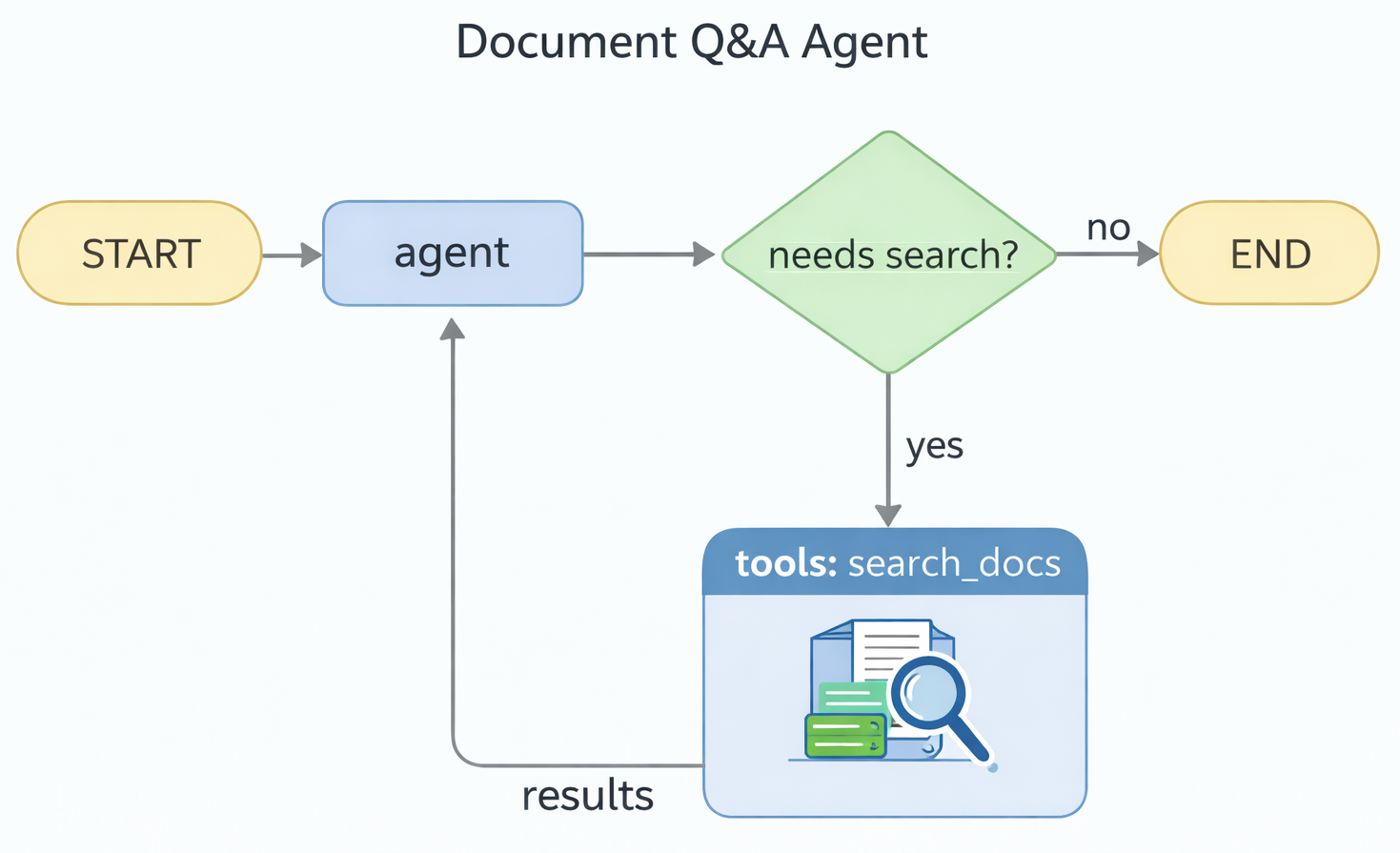
The pattern: give the model a search tool and let it decide when to use it.
Search as a tool
from langchain_core.tools import tool

@tool
def search_docs(query: str) -> str:
    """Search documents for information relevant to the query."""
    results = retriever.invoke(query)
    if not results:
        return "No relevant documents found."
    return "\n\n---\n\n".join(
        f"Source: {doc.metadata.get('source', 'unknown')}\nContent: {doc.page_content}"
        for doc in results
    )
The tool returns formatted search results that the model can use to answer questions.
Complete example: document Q&A agent
from langchain_google_genai import ChatGoogleGenerativeAI
from langchain_core.messages import SystemMessage
from langchain_core.tools import tool
from langgraph.graph import StateGraph, MessagesState, START, END
from langgraph.prebuilt import ToolNode, tools_condition

llm = ChatGoogleGenerativeAI(model="gemini-2.5-flash")

tools = [search_docs]
llm_with_tools = llm.bind_tools(tools)

SYSTEM_PROMPT = """You are a helpful assistant that answers questions using the provided documents.
Use the search_docs tool when you need information from the documents to answer the user's question."""
Complete example (continued)
def agent(state: MessagesState):
    messages = [SystemMessage(content=SYSTEM_PROMPT)] + state["messages"]
    return {"messages": [llm_with_tools.invoke(messages)]}

graph = StateGraph(MessagesState)
graph.add_node("agent", agent)
graph.add_node("tools", ToolNode(tools))
graph.add_edge(START, "agent")
graph.add_conditional_edges("agent", tools_condition)
graph.add_edge("tools", "agent")
app = graph.compile()
This is the same pattern from deck 05—but now the tool searches documents.
Running the agent
Typically, the agent will:
- Call
search_docswith a relevant query - Read the results
- Synthesize an answer
What the model decides
The model chooses when to search:
| Query | Likely action |
|---|---|
| “How do I run the tests?” | Calls search_docs |
| “What database does the project use?” | Calls search_docs |
| “What’s 2 + 2?” | Answers directly |
| “Thanks!” | Responds directly |
The system prompt can guide this behavior.
Multi-turn document Q&A
Because we’re using MessagesState, conversations work naturally:
The system prompt is prepended inside the agent function — callers just pass messages. The model can reference previous answers and search results.
Extending to semantic search
BM25 matches keywords. Semantic search matches meaning:
| Query | BM25 finds | Semantic search finds |
|---|---|---|
| “car” | Documents with “car” | Documents about automobiles, vehicles |
| “happy” | Documents with “happy” | Documents about joy, satisfaction |
Coming soon: Vector embeddings and hybrid retrieval (combining both approaches).
Best practices summary
- Keep conversation history — pass full message list for multi-turn
- Use system prompts — guide model behavior without storing in state
- Chunk appropriately — balance relevance vs. context (500-1500 chars typical)
- Let the model decide — don’t force search on every query
Key takeaways
- Multi-turn chat works by accumulating messages in
MessagesState - The model re-reads the full conversation each turn—it doesn’t “remember”
- Document retrieval: load → chunk → retriever → search
BM25Retrieverprovides fast keyword search with a standard interface- A document Q&A agent is just a chatbot with a search tool