Semantic Search and Embeddings
2026-02-24
Today’s goals
- Understand what embeddings are and how they enable semantic search
- Build a semantic retriever with
GoogleGenerativeAIEmbeddingsand FAISS - Compare keyword (BM25) vs semantic search strengths
- Combine both approaches with
EnsembleRetriever - Upgrade our document Q&A agent to use hybrid retrieval
Recall: BM25 keyword search
From deck 06, we built a retriever using BM25:
BM25 matches documents containing the exact query terms.
The synonym problem
BM25 struggles when users use different words than the documents:
| User asks about… | Document says… | BM25 finds it? |
|---|---|---|
| “car” | “automobile” | ❌ No |
| “happy” | “joyful” | ❌ No |
| “purchase” | “buy” | ❌ No |
| “error handling” | “exception management” | ❌ No |
Keywords must match exactly–a fundamental limitation.
What are embeddings?
An embedding is a list of numbers (a vector) that represents the meaning of text.
- Similar meanings → similar vectors
- Different meanings → different vectors
The embedding model learns these representations from massive text datasets.
Similarity in vector space
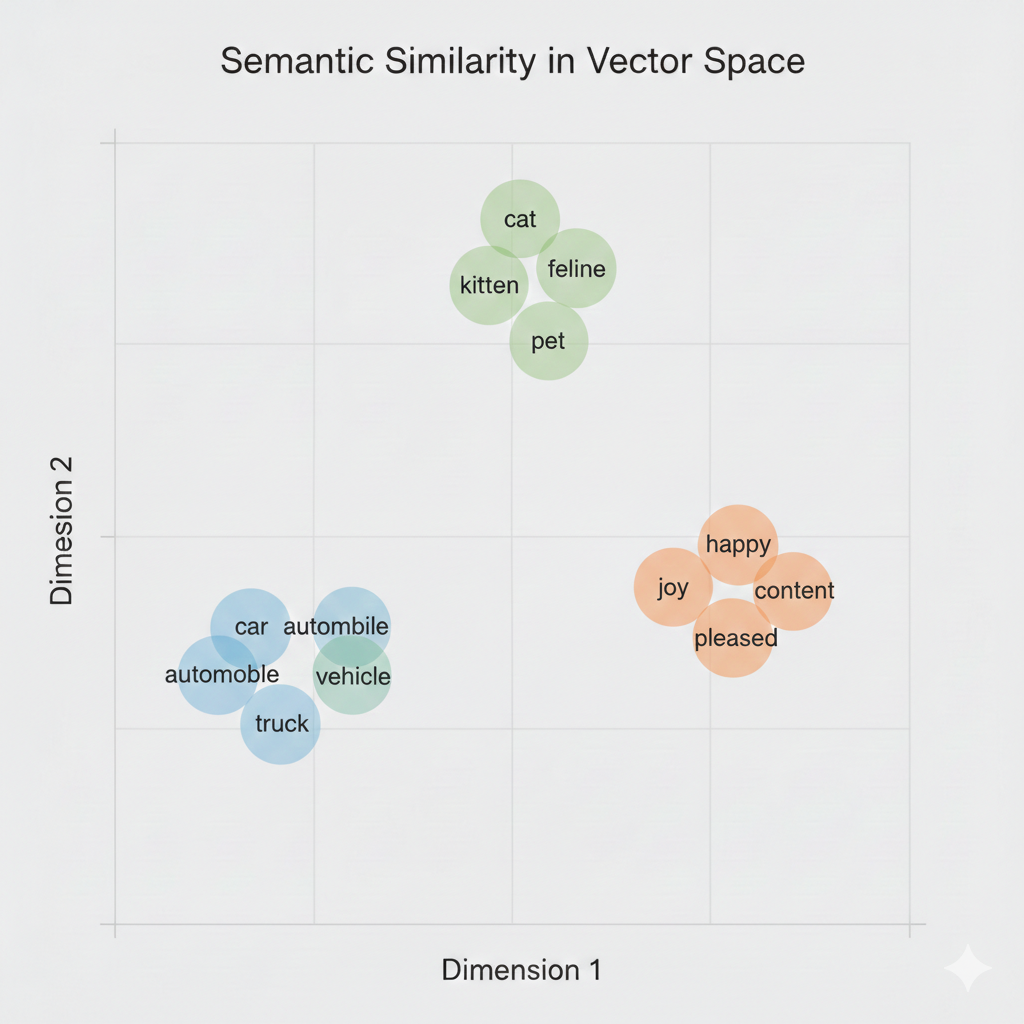
Words with similar meanings cluster together in embedding space.
Embeddings vs token embeddings
In deck 02, we saw that LLMs use token embeddings internally:
| Token embeddings (deck 02) | Text embeddings (today) |
|---|---|
| One vector per token | One vector for entire text |
| Internal to the model | Standalone output |
| Enables next-token prediction | Enables similarity search |
Today’s embeddings compress an entire sentence or paragraph into one vector.
How frontier embedding models are trained
Modern embedding models (Gemini, OpenAI, etc.) follow a two-stage approach:
1. Start from LLM — Adapt and initialize from pre-trained LLM weights
2. Fine-tune with contrastive learning — Train on text pairs to optimize for similarity
Step 1: Why start from an LLM?
During pre-training, LLMs learn rich representations of language:
- Word meanings and relationships
- Syntax and grammar patterns
- World knowledge and facts
- Multilingual connections (100+ languages for Gemini)
Starting from these learned representations means the embedding model doesn’t have to learn language from scratch.
Step 1: Adapting the architecture
To create an embedding model from an LLM:
- Adapt attention — switch from unidirectional to bidirectional (change the attention mask, not the weights)
- Initialize weights — start from the pre-trained LLM parameters
- Add pooling — combine token representations into a single vector (e.g., average them)
- Add projection — linear layer to target embedding dimension (e.g., 3072 for Gemini)
Why bidirectional?
Example: “The bank was steep”
When computing the representation for “bank”:
Unidirectional: “bank” only attends to [“The”, “bank”] — can’t see “was steep”
Bidirectional: “bank” attends to all tokens — sees “steep” → river bank
With “The bank was closed”, bidirectional sees “closed” → financial bank.
For embeddings, full context from both directions helps capture meaning.
Step 2: Contrastive learning
The model learns from pairs of texts:
- Positive pairs: texts that should be close (query ↔︎ relevant document)
- Negative pairs: texts that should be far apart (query ↔︎ unrelated document)
The model learns by contrasting similar and dissimilar examples.
Step 2: The training objective
Adjust model weights to:
- Pull positive pairs closer in vector space
- Push negative pairs farther apart
After training on millions of pairs, the model learns general patterns of semantic similarity — not just the specific examples it saw.
Step 2: Training data
Where do the training pairs come from?
| Source | Example pair |
|---|---|
| Web corpus | Page title ↔︎ page content |
| Synthetic (LLM-generated) | LLM writes a question for a given passage |
| Search logs | Query ↔︎ clicked result |
| Paraphrases | “Great movie” ↔︎ “Excellent film” |
Gemini Embedding uses billions of web pairs plus synthetic data generated by prompting Gemini to create queries for passages.
The semantic search process
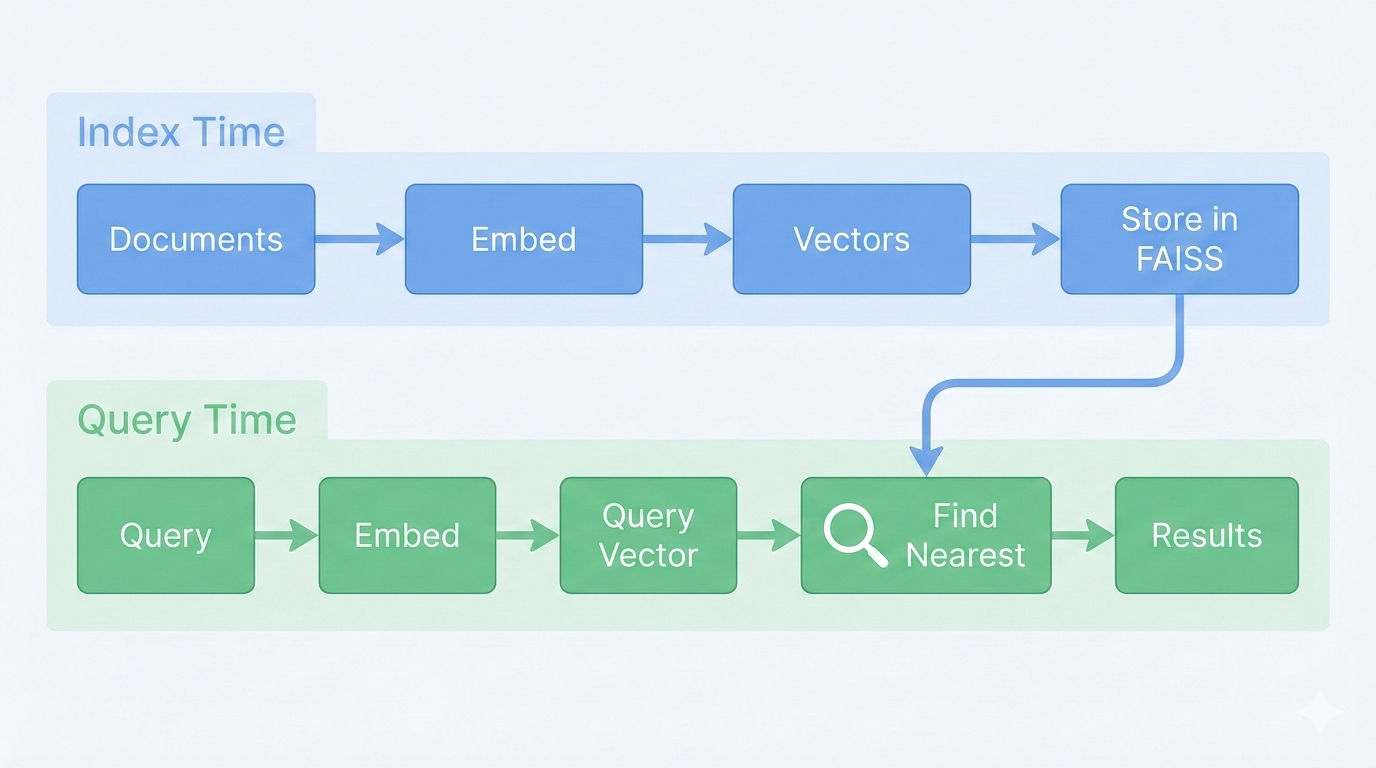
Index time: Embed all document chunks and store vectors. Query time: Embed query and find nearest stored vectors.
Measuring similarity: cosine
How do we find “nearest” vectors? Cosine similarity:
\[\text{similarity} = \frac{\vec{a} \cdot \vec{b}}{|\vec{a}| \times |\vec{b}|}\]
- Returns a value between -1 and 1
- 1 = identical direction (same meaning)
- 0 = perpendicular (unrelated)
- -1 = opposite direction
Find the vectors with highest cosine similarity to our query.
BM25 vs Semantic: tradeoffs
| Aspect | BM25 (Keyword) | Semantic (Embedding) |
|---|---|---|
| Matches | Exact terms | Meaning/concepts |
| “car” finds “automobile”? | ❌ No | ✅ Yes |
| Handles typos? | ❌ No | ✅ Often |
| Exact phrase match? | ✅ Strong | ⚠️ Weaker |
| Speed | Very fast | Fast (with index) |
| Requires | Just text | Embedding model |
Part 2: Building Semantic Search
Google’s embedding model
- 3072 dimensions per vector
- Supports 100+ languages
- Uses the same
GOOGLE_API_KEYasChatGoogleGenerativeAI
FAISS: vector storage
FAISS (Facebook AI Similarity Search) stores and searches vectors efficiently:
FAISS automatically:
- Calls
embeddings.embed_documents()on all chunks - Builds an index for fast similarity search
Note
FAISS is available as faiss-cpu or faiss-gpu depending on your hardware.
Creating a semantic retriever
The as_retriever() method returns a retriever with the standard .invoke() interface.
Key insight: You can swap BM25 for semantic search with minimal code changes.
Complete semantic search setup
from langchain_community.document_loaders import DirectoryLoader, TextLoader
from langchain_text_splitters import RecursiveCharacterTextSplitter
from langchain_google_genai import GoogleGenerativeAIEmbeddings
from langchain_community.vectorstores import FAISS

# 1. Load documents (same as deck 06)
loader = DirectoryLoader("./docs", glob="**/*.txt", loader_cls=TextLoader)
documents = loader.load()

# 2. Split into chunks (same as deck 06)
splitter = RecursiveCharacterTextSplitter(chunk_size=1000, chunk_overlap=100)
chunks = splitter.split_documents(documents)

# 3. Create embeddings and vector store (NEW)
embeddings = GoogleGenerativeAIEmbeddings(model="models/gemini-embedding-001")
vectorstore = FAISS.from_documents(chunks, embeddings)
semantic_retriever = vectorstore.as_retriever(search_kwargs={"k": 3})
When each approach wins
Semantic wins:
- Query: “automobile maintenance”
- Finds: “Regular car servicing extends vehicle life.”
- Why: “automobile” ≈ “car”, “maintenance” ≈ “servicing”
BM25 wins:
- Query: “error code E_AUTH_FAILED”
- Finds: “E_AUTH_FAILED indicates authentication failure.”
- Why: exact match on the error code
Part 3: Hybrid Retrieval
Best of both: hybrid retrieval
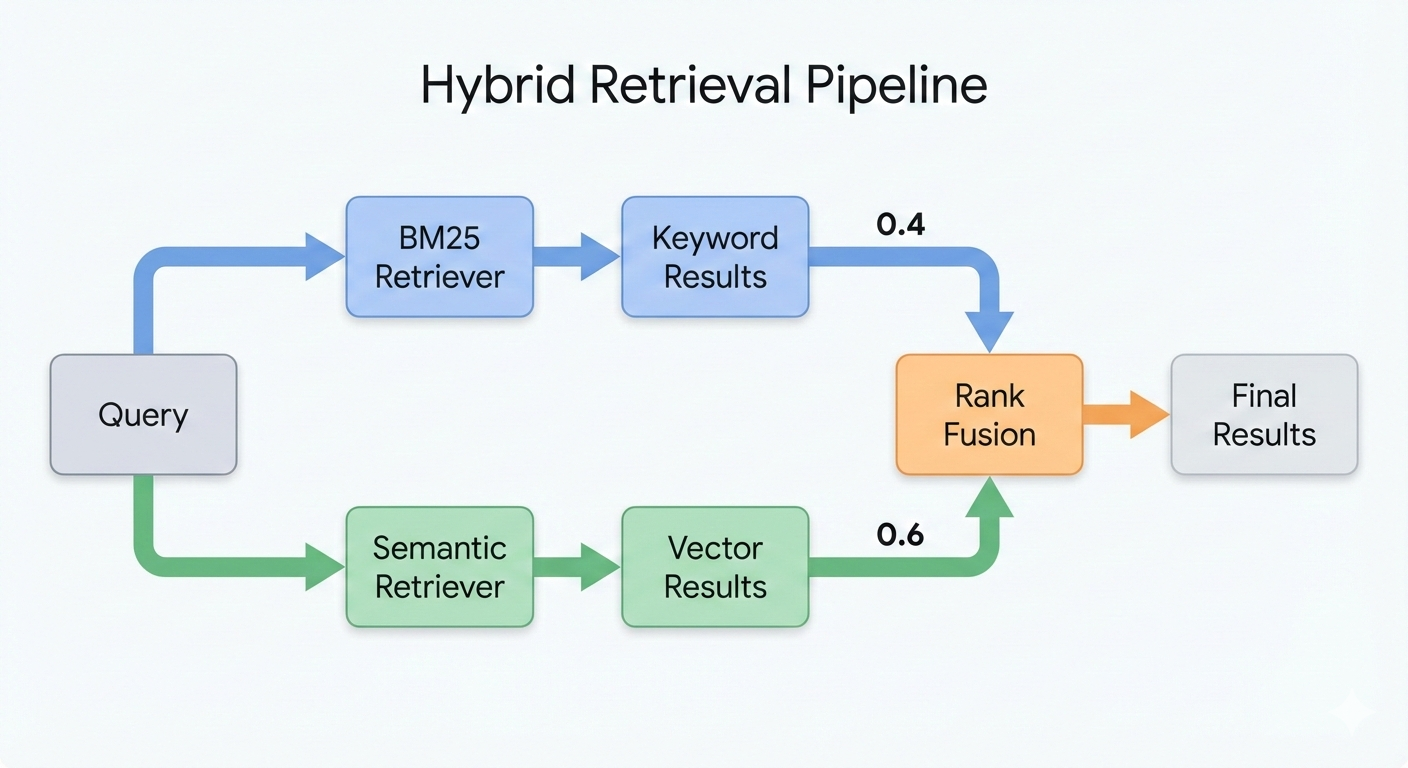
Hybrid retrieval runs both retrievers and merges the results.
EnsembleRetriever
from langchain_classic.retrievers import EnsembleRetriever
from langchain_community.retrievers import BM25Retriever

# Create both retrievers
bm25_retriever = BM25Retriever.from_documents(chunks, k=3)
semantic_retriever = vectorstore.as_retriever(search_kwargs={"k": 3})

# Combine with weights
hybrid_retriever = EnsembleRetriever(
    retrievers=[bm25_retriever, semantic_retriever],
    weights=[0.4, 0.6]  # 40% BM25, 60% semantic
)

results = hybrid_retriever.invoke("refund policy")
The weights control relative importance of each retriever’s results.
A note on langchain_classic
EnsembleRetriever lives in langchain_classic—a legacy package maintained until Dec 2026.
It provides built-in Reciprocal Rank Fusion (RRF), which we’ll see next.
The modern alternative is RunnableParallel from langchain_core with manual RRF—more flexible but more code.
How rank fusion works
EnsembleRetriever uses Reciprocal Rank Fusion (RRF):
\[\text{RRF}(d) = \sum_{r \in \text{retrievers}} \frac{w_r}{\text{rank}_r(d) + k}\]
- Each retriever ranks documents
- Higher rank (lower number) → higher score
- Weighted sum combines rankings
- Documents found by both retrievers score highest
The constant \(k\) (default=60) prevents top-ranked items from dominating.
Tuning weights
| Use case | BM25 weight | Semantic weight |
|---|---|---|
| Technical docs with exact terms | 0.6 | 0.4 |
| General Q&A | 0.4 | 0.6 |
| Code search | 0.7 | 0.3 |
| Conversational queries | 0.3 | 0.7 |
Note
These are example starting points, not proven values. Experiment and adjust based on your documents and query patterns.
Part 4: Hybrid RAG Agent
Upgrading the deck 06 search tool
In deck 06, we built a document Q&A agent with BM25:
To upgrade to hybrid search, we change one line:
The tool definition and LangGraph structure stay exactly the same.
Part 5: Summary
Best practices
- Start with hybrid — it’s more robust than either approach alone
- Tune weights based on your document type and query patterns
- Chunk thoughtfully — embeddings work best on coherent text units
Key takeaways
- Embeddings represent text meaning as vectors
- Semantic search finds conceptually similar documents, not just keyword matches
- FAISS efficiently stores and searches embedding vectors
- Hybrid retrieval combines BM25 and semantic for the best of both
- The agent structure is unchanged — only the retriever is upgraded